
Locator maps track your current location and update as you move.
Regular maps show fixed areas, but locator maps follow your position constantly.
Quick Answer: How to Make Locator Map
Combine a map with a compass in a crafting table to create a locator map. Place the map in the center square and the compass directly above it. The resulting locator map displays your exact location and updates in real-time as you explore.
Understanding Locator Maps
Locator maps are enhanced versions of regular maps in Minecraft.
They show your current position marked with a white arrow or pointer.
The map updates automatically as you move around the world.
Key locator map features:
- Shows your real-time position on the map
- White pointer indicates your exact location
- Follows you across the world
- Works in all dimensions (Overworld, Nether, End)
- Can be copied to create backup maps
- Doesn’t show a fixed area like regular maps
Locator maps are essential for navigation in large worlds.
Crafting Locator Map: Step-by-Step
Materials You Need
Before crafting, gather the required items.
What you need:
- 1 map (crafted or found)
- 1 compass (crafted with iron ingots and redstone)
Both items are easy to make or find.
Crafting the Map
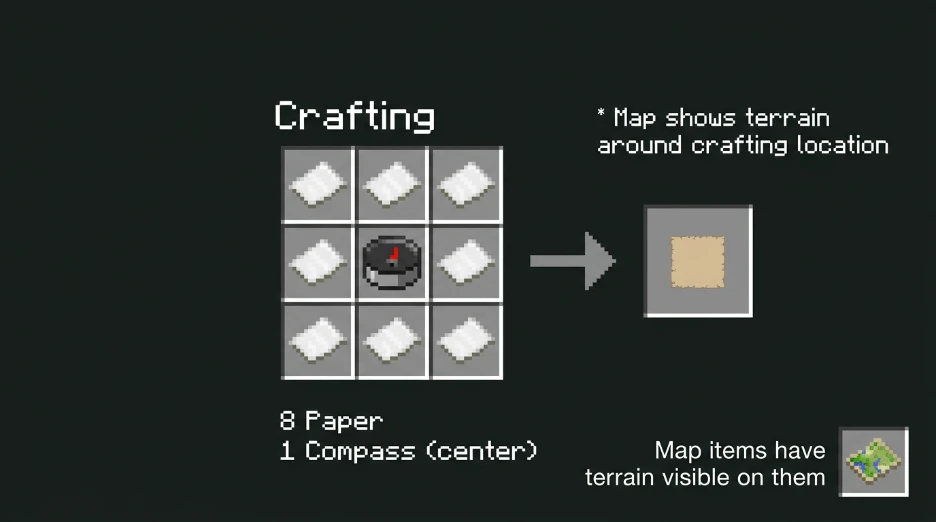
First, obtain or craft a regular map.
Map crafting recipe:
- 8 paper (craft from sugar cane)
- 1 compass (center square)
- Arrange in a 3×3 grid with the compass in the middle
This creates a blank map of your current area.
Crafting the Compass
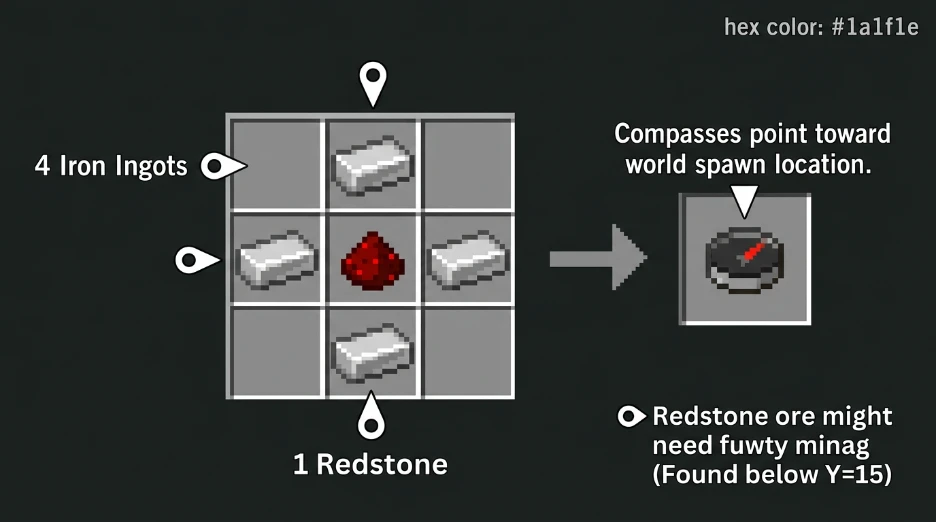
Compasses point toward the world spawn location.
Compass recipe:
- 4 iron ingots
- 1 redstone (center square)
- Arrange in a + shape
Redstone comes from mining redstone ore at Y-level -59.
Combining to Make Locator Map

Place your completed map in the crafting table center square.
Place the compass directly above it (north position).
The locator map appears in output slot.
The map now tracks your position with a white pointer.
Locator Map vs Regular Map Comparison
| Feature | Regular Map | Locator Map |
|---|---|---|
| Shows Fixed Area | Yes | Yes |
| Tracks Player | No | Yes |
| Updates Position | No | Yes |
| Requires Compass | No | Yes |
| Crafting Cost | Lower | Higher |
| Navigation Help | Limited | Excellent |
| Works in Nether | Yes | Yes |
| Pointer Shows Location | No | Yes (white) |
Locator maps cost more but provide navigation tracking.
How Locator Maps Work
Reading Your Position
The white pointer on the map shows exactly where you are.
The pointer updates every time you move.
Rotate your view to see the map from different angles.
The map follows your movement in real-time.
Mapping Different Dimensions
Create separate locator maps for Overworld and Nether.
Maps from one dimension don’t work in others correctly.
Nether maps show Nether terrain only.
End maps are limited but still functional.
Keep organized locator maps for each major area.
Practical Tips for Locator Maps
Expanding Your Map
Maps show fixed 128×128 block areas.
You cannot see beyond this range on one map.
Create multiple locator maps for different regions.
Plan exploration routes across multiple map areas.
Marking Important Locations
Locator maps don’t show markers or waypoints natively.
Use visual landmarks on the map to remember locations.
Combine multiple maps to create a mental atlas.
Take screenshots of maps showing important places.
Using Coordinates
Coordinates display in the bottom-left corner of most maps.
Write down coordinates at key locations.
Ore Finder can display coordinates for resources on a map.
Match map locations with resource coordinates for faster navigation.
Copying Locator Maps
Place completed locator map and empty map together on crafting table.
Produces duplicate map showing same area and tracking.
Useful for backup navigation or sharing with teammates.
Map Scaling
All Minecraft maps show the same 128×128 block area.
Zoomed-out versions don’t exist in vanilla Minecraft.
Plan your map collection strategically for coverage.
Common Locator Map Mistakes
Creating maps without compasses makes regular maps (no tracking).
Forgetting paper requires sugar cane cultivation time.
Using old maps from different seeds won’t track correctly.
Expecting maps to show beyond the 128×128 block range.
Not creating enough maps for large world exploration.
Locator Maps on Different Platforms
Locator maps work identically on all Minecraft platforms.
Java Edition, Bedrock, and consoles craft them the same way.
Mobile versions also support locator map creation.
The map interface differs slightly, but functionality remains identical.
When to Make Locator Maps
Essential Situations
Starting new survival worlds (planning exploration routes).
Building bases far from spawn (tracking return routes).
Exploring large landscapes (avoiding getting lost).
Mapping underground cave systems (finding way back).
Optional Situations
Small confined bases (locator maps unnecessary).
Creative mode (less critical for survival).
Multiplayer worlds with friends (coordination help).
Using Locator Maps with Tools
Locator maps pair well with coordinate tracking tools.
Note coordinates while viewing your locator map.
Use these coordinates with /tp command for fast navigation.
Store maps and coordinates together in an organized system.
FAQ
How do you make a locator map in Minecraft?
Craft a regular map using 8 paper and 1 compass. Then place that map in the crafting table center with another compass above it. The resulting locator map tracks your position with a white pointer. Updates in real-time as you move across the world.
What is a locator map used for?
Locator maps track your exact location and show it updating as you explore. Essential for navigation in large worlds. Shows your white pointer position at all times. Prevents getting lost when exploring far from base. Creates visual reference of terrain you’ve traveled through.
Do you need a compass for a locator map?
Yes. Locator maps require both a regular map and a compass to craft. Compasses point toward world spawn and are needed for map creation. Without a compass, you can only craft regular maps without position tracking. Both items are essential for locator map creation.
Can you use locator maps in the Nether?
Yes. Locator maps work in the Nether but show Nether terrain only. Create separate Nether-specific locator maps for accurate navigation underground. Maps from the Overworld don’t transfer to the Nether correctly. Each dimension requires its own mapped locator maps for best results.
How far do locator maps show in Minecraft?
Locator maps display a 128×128 block area of terrain. Shows your location within this fixed range. Cannot zoom out or show larger areas. Create multiple maps to cover different regions and plan exploration routes connecting them.
Make Your First Locator Map
Locator maps are essential navigation tools for survival worlds.
Craft them early with simple materials: paper and a compass.
Track your location constantly while exploring new territory.
Stop getting lost and start mapping your world today.
Leave a Reply