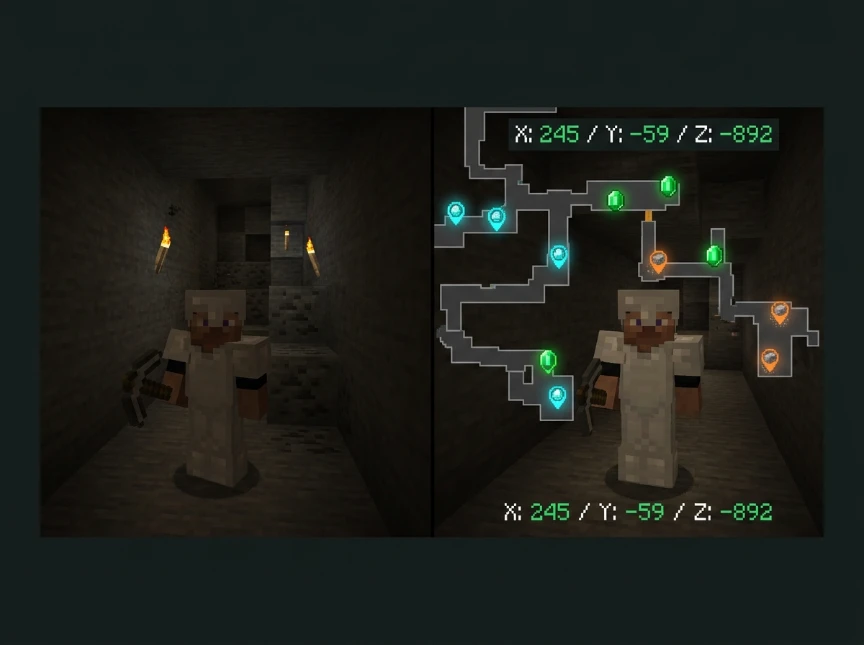
Finding specific ores in Minecraft takes hours of random mining.
You need a reliable ore finder that shows exact coordinates without guessing.
Quick Answer: Is There an Ore Finder in Minecraft?
Vanilla Minecraft doesn’t have a built-in ore finder tool. However, seed-based ore finders like Ore Finder show exact ore locations by reading your world seed and displaying coordinates for emeralds, diamonds, iron, and ancient debris.
These tools work for both Java and Bedrock editions.
How Ore Finders Work in Minecraft
Minecraft generates worlds using numerical seeds. Every seed creates an identical ore placement.
Ore finder tools read your world seed and calculate where ores spawn using Minecraft’s generation algorithms.
You get an interactive map showing exact X, Y, Z coordinates for every ore vein in your world.
This works because ore generation is deterministic. The same seed always produces the same ore locations.
Best Free Ore Finder for Minecraft Bedrock
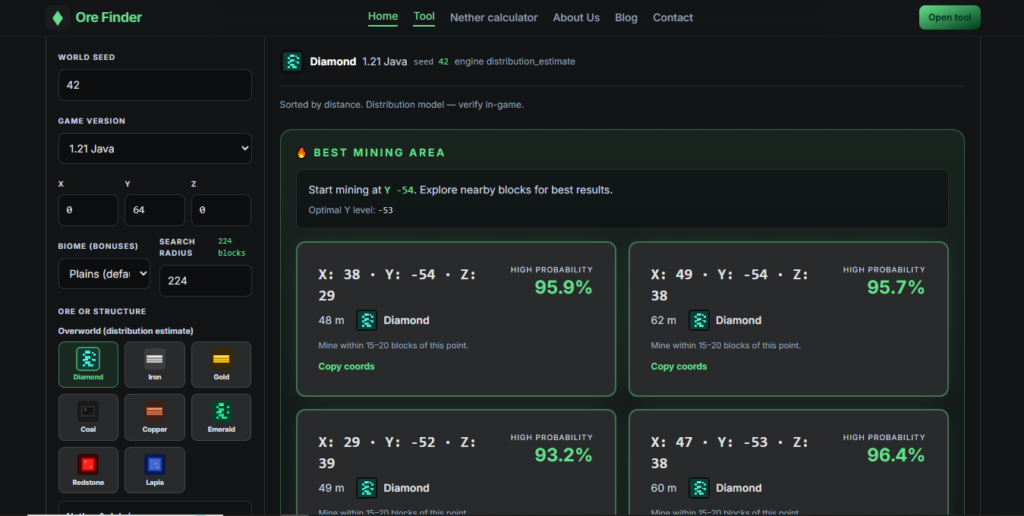
Ore Finder supports both Bedrock and Java editions with full ore mapping.
Enter your world seed (found in world settings on Bedrock). The tool generates a complete ore distribution map.
You can filter by ore type: diamonds, emeralds, iron, gold, coal, redstone, lapis, or ancient debris.
Click any ore cluster to see the exact coordinates. Navigate directly to rich ore veins instead of mining randomly.
Bedrock Edition works identically across mobile, console, Xbox, PlayStation, Switch, and Windows 10.
Best Free Ore Finder for Minecraft Java
Java Edition ore finders use the same seed-based mapping as Bedrock.
Press F3 in Java to view your world seed. Copy it into an ore finder tool.
The tool displays ore coordinates for your specific Java world generation.
Java and Bedrock use different generation engines, so always specify your edition when using ore finders.
OreFinder automatically detects your Minecraft version and applies the correct ore distribution algorithms.
How to Get Ore Finding Tools in Minecraft
You cannot install them as in-game mods or plugins in vanilla Minecraft.
Other finders are external web tools or applications you use outside the game.
Steps to use an ore finder:
- Find your world seed in game settings
- Enter the seed at OreFinder.io
- Select your Minecraft version (Java or Bedrock)
- Choose which ore type to locate
- View the interactive map with exact coordinates
- Write down coordinates and navigate in-game
No mods, downloads, or installations required. Everything runs in your browser.
Free Emerald Ore Finder for Minecraft
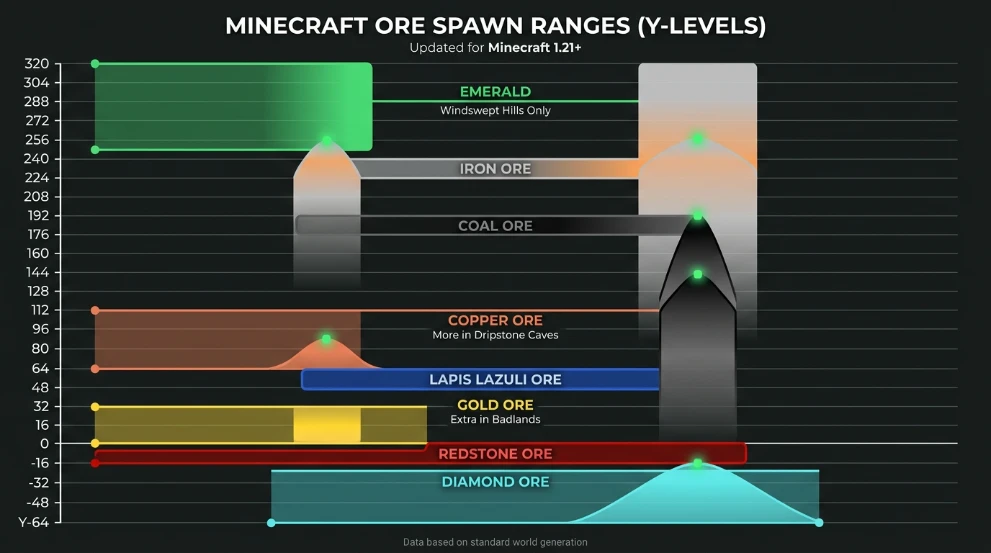
Emeralds only spawn in mountain biomes at specific Y-levels.
Finding them manually requires extensive mountain exploration and mining.
An emerald ore finder shows every emerald vein location in mountain biomes across your world.
Emerald spawn details:
- Only generates in mountain, windswept hills, and grove biomes
- Spawns from Y-32 to Y256
- Peaks around Y224 in mountain peaks
- Very rare compared to other ores
Using OreFinder for emeralds saves hours of searching mountain ranges randomly.
Filter the map to show only emerald ore. Navigate to coordinates with confirmed emerald veins.
Ore Finder Support for Minecraft 1.20 and 1.21
Ore distribution changed significantly in Minecraft 1.18 (Caves & Cliffs update).
Older ore finders using pre-1.18 algorithms give wrong coordinates for current versions.
OreFinder supports:
- Minecraft 1.20 Bedrock Edition (all platforms)
- Minecraft 1.21 Bedrock Edition (all platforms)
- Minecraft 1.20+ Java Edition
- Legacy versions with different ore distributions
Always verify your ore finder supports your exact Minecraft version. Outdated tools send you to empty coordinates.
What Ores Can You Find?
Comprehensive ore finders map all major ores:
| Ore Type | Y-Level Range | Peak Concentration | Biome Specific |
|---|---|---|---|
| Diamond | -64 to 16 | Y-59 | All biomes |
| Emerald | -16 to 256 | Y224 | Mountains only |
| Iron | -64 to 320 | Y16 & Y232 | All biomes |
| Gold | -64 to 32 | Y-16 | All biomes |
| Copper | -16 to 112 | Y48 | All biomes |
| Lapis | -64 to 64 | Y0 | All biomes |
| Redstone | -64 to 16 | Y-59 | All biomes |
| Coal | 0 to 256 | Y96 | All biomes |
Ancient debris (netherite) works differently since it spawns in the Nether dimension at Y8-Y119.
Using Coordinates from Ore Finders
Ore finders give you three numbers: X (east/west), Y (height), Z (north/south).
On Java Edition: Press F3 to see your current coordinates. Navigate until your XYZ matches the ore finder coordinates.
On Bedrock Edition: Enable “Show Coordinates” in world settings. Your position displays at the top of the screen.
Mine at the exact coordinates provided. Ore veins extend 2-8 blocks in any direction from the center point.
Ore Finder vs Manual Mining Efficiency
Random strip mining at optimal Y-levels finds ores eventually but wastes time.
Ore finders eliminate guesswork by showing you exactly where rich ore veins exist.
Time comparison:
- Manual diamond mining: 2-4 hours for 20+ diamonds
- Ore finder navigation: 20-40 minutes for 20+ diamonds
- Manual emerald searching: 3-6 hours for 10 emeralds
- Ore finder emerald locations: 30-60 minutes for 10 emeralds
You spend less time mining and more time building or exploring.
Do Ore Finders Work on Servers?
Ore finders work on any world where you know the seed.
Single-player worlds: You control the world and can always view the seed.
Multiplayer servers: You need the seed from the server owner. Most public servers don’t share seeds to prevent Ore Finder usage.
Realms: Realm owners can view and share the seed with players.
Private servers with friends typically share seeds freely for collaborative mining.
Ore Finder Limitations
Ore finders show where ores generate at world creation, not their current state.
If another player has already mined a vein, it won’t show as gone on the ore finder map.
Ore regeneration doesn’t exist in vanilla Minecraft. Once mined, ore veins don’t respawn.
Ore finders also can’t detect ores in already-generated chunks that were created with different world generation settings.
Alternative to Ore Finders: Manual Mining
If you can’t access your world seed, manual mining at optimal Y-levels works.
Check our guides for the best coordinates:
- Where to Find Diamonds in Minecraft – Complete Y-level guide
- Best Y Coordinate for Iron – Iron mining efficiency
- Y Coordinate for Netherite – Ancient debris locations
These manual methods take longer but work without seed access.
FAQ
Is there a free ore finder for Minecraft Bedrock Edition?
Yes. OreFinder.io is completely free for Bedrock Edition across all platforms (mobile, Xbox, PlayStation, Switch, Windows 10). Enter your world seed to view ore locations. No downloads or payments required. Works for Minecraft 1.20 and 1.21 Bedrock versions with accurate ore coordinates.
How do I find my world seed in Minecraft?
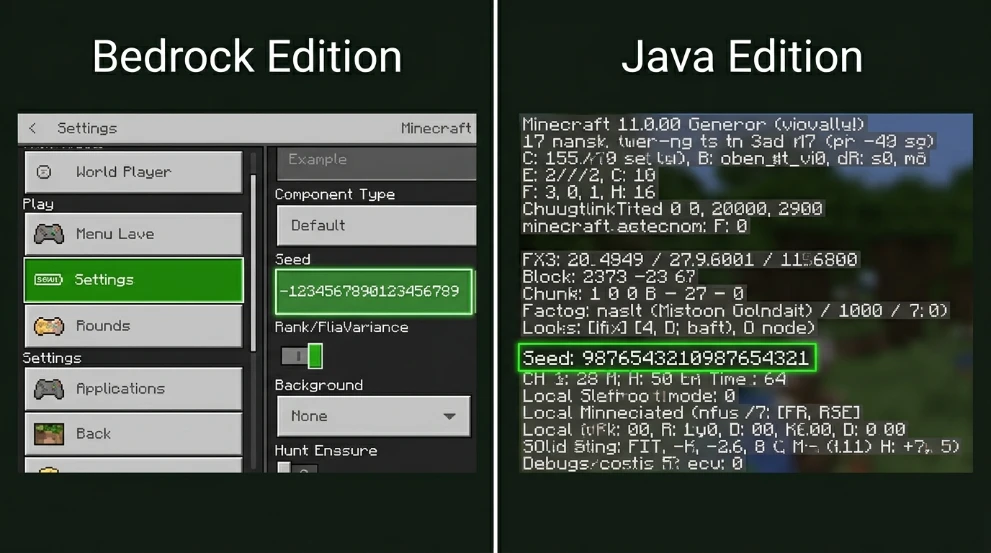
On Bedrock, open Settings > Game > scroll down to see your Seed number. On Java Edition, use the /seed command (requires cheats) or press F3 and look for the Seed line. Copy the entire number and paste it into an ore finder tool for coordinate mapping.
Does the best ore finder work for Minecraft Java Edition?
Yes. OreFinder supports both Java and Bedrock editions. Java Edition players can enter their world seed to view ore distributions. The tool uses version-specific generation algorithms to provide accurate coordinates for Java worlds. Works with Minecraft 1.18+,u including current versions.
Can I use ore finders without mods or cheats?
Yes. Ore finders are external web tools, not mods or cheats. They don’t modify your game or require downloads. You only need your world seed (visible in world settings without cheats on Bedrock, or with /seed on Java). Using ore finders doesn’t affect achievements or violate vanilla gameplay.
What’s the best free ore finder for finding emeralds in Minecraft?
OreFinder.io provides free emerald location mapping for both Java and Bedrock. Filter the ore map to show only emerald veins in mountain biomes. You get exact X, Y, Z coordinates for every emerald cluster in your world, eliminating hours of random mountain exploration and mining.
Find Ores Faster with the Right Tools
Vanilla Minecraft doesn’t include built-in ore finders.
Seed-based ore mapping tools show exact coordinates for every ore type in your world.
Stop mining randomly and start navigating directly to rich ore veins.
Use Ore Finder to locate diamonds, emeralds, iron, and ancient debris in minutes instead of hours.
Leave a Reply