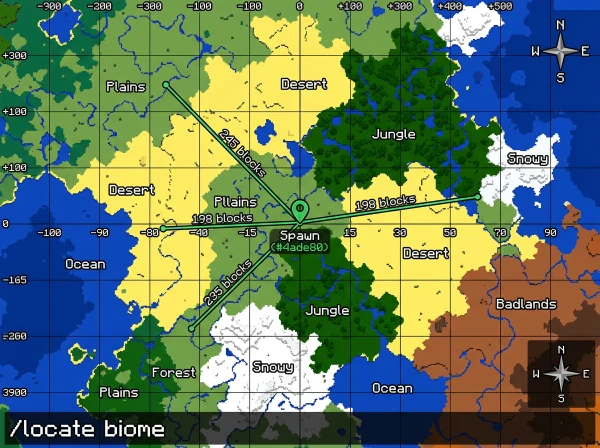
Finding specific biomes near your base takes hours of random exploration.
You need the fastest method to locate the two nearest biomes without wandering aimlessly.
Quick Answer: How to Find the Closest Biomes in Minecraft
Use /locate biome [biome_name] command to find the nearest biome of any type. Run the command twice with different biome names to find your two closest biomes.
Alternatively, use a biome finder tool with your world seed for instant results.
Understanding Biome Proximity in Minecraft
Biomes generate based on temperature, humidity, and terrain algorithms.
Some biomes naturally spawn next to each other. Others never border each other.
Common biome neighbors:
- Plains → Forest, Sunflower Plains
- Desert → Savanna, Badlands
- Ocean → Beach, any coastal biome
- Taiga → Snowy Plains, Mountains
- Jungle → Bamboo Jungle, Sparse Jungle
Spawn points usually generate in temperate biomes like plains or forests.
The two closest biomes depend entirely on your spawn location and world seed.
Using /locate biome Command
The locate command finds the nearest biome of a specific type.
Enable cheats in world settings or when creating your world.
Command format:
/locate biome minecraft:[biome_name]Examples:
/locate biome minecraft:jungle
/locate biome minecraft:desert
/locate biome minecraft:cherry_grove
The command returns coordinates with distance in blocks.
Click coordinates in chat to auto-generate a teleport command.
Finding Your Two Nearest Biomes Step-by-Step
Method 1: Using commands
- Note your current spawn coordinates (press F3 on Java or check coordinates on Bedrock)
- Run /locate the biome for your first target biome
- Write down the distance shown
- Run /locate the biome for your second target biome
- Compare distances to determine which two are closest
Method 2: Manual exploration
Enable coordinates and walk in each cardinal direction (north, south, east, west).
Note which biomes you encounter first in each direction.
The two with the shortest distances are your closest biomes.
Method 3: Using OreFinder
Enter your world seed at OreFinder.
View the complete biome map showing all biomes around spawn.
Identify the two nearest biomes visually without any commands or walking.
Get exact coordinates for both biomes instantly.
Common Biome Pairs Near Spawn
| Spawn Biome | Typical Nearest Biome 1 | Typical Nearest Biome 2 |
|---|---|---|
| Plains | Forest | River |
| Forest | Plains | Birch Forest |
| Desert | Savanna | Badlands |
| Taiga | Snowy Taiga | Mountains |
| Savanna | Plains | Acacia Savanna |
| Ocean | Beach | Coastal biome |
These patterns repeat across most worlds but vary by seed.
Biome Distance Calculation
Minecraft measures biome distance in blocks from your current position.
The /locate command shows the exact block count to the biome center.
Distance examples:
- “243 blocks away” = very close (2-3 minutes walking)
- “1,847 blocks away” = medium distance (15-20 minutes walking)
- “5,623 blocks away” = far (requires Nether travel or elytra)
Closer than 500 blocks = easily accessible on foot.
1000-3000 blocks = consider using Nether for 8x faster travel.
Use the Nether Calculator to convert Overworld coordinates for portal placement.
Why Finding Nearest Biomes Matters
Different biomes provide unique resources unavailable elsewhere.
Resource-specific biomes:
- Jungle – bamboo, cocoa beans, pandas, parrots
- Desert – sand, cacti, desert temples, suspicious sand
- Mangrove Swamp – mangrove wood, mud blocks, frogs
- Badlands – terracotta, gold ore (higher spawn rate)
- Cherry Grove – cherry wood, pink petals
Knowing the nearest biomes helps you plan efficient resource runs.
Building near biome borders gives access to multiple resource types quickly.
Complete List of Locatable Biomes
Overworld biomes for /locate command:
- minecraft:plains
- minecraft:forest
- minecraft:taiga
- minecraft:swamp
- minecraft:mangrove_swamp
- minecraft:jungle
- minecraft:desert
- minecraft:savanna
- minecraft:badlands
- minecraft:mushroom_fields
- minecraft:ice_spikes
- minecraft:cherry_grove
- minecraft:deep_dark
- minecraft:meadow
- minecraft:grove
- minecraft:snowy_slopes
This list works for Java and Bedrock editions.
Finding Rare Biomes Near You
Some biomes are extremely rare and might not exist within 10,000 blocks.
Rare biomes:
- Mushroom Fields
- Ice Spikes
- Bamboo Jungle
- Eroded Badlands
- Modified Jungle Edge (removed in 1.18+)
Use /locate biome to check if rare biomes exist near spawn.
If the command returns 15,000+ blocks, the biome is extremely distant.
OreFinder shows whether rare biomes exist in your world at all.
The tool maps the entire world, revealing if certain biomes generated or not.
Biomes That Never Spawn Together
Minecraft’s biome generation prevents certain combinations.
Biomes that don’t border each other:
- Ice Spikes + Jungle (opposite temperature zones)
- Desert + Snowy Taiga (conflicting climates)
- Mushroom Fields + any biome (always isolated by ocean)
- Deep Dark + surface biomes (underground only)
Understanding these rules helps you identify realistic biome searches.
Using Coordinates to Track Biome Locations
Write down coordinates when you find important biomes.
Create a biome coordinate list:
- Desert: X=450, Z=-230 (380 blocks from spawn)
- Jungle: X=-890, Z=120 (920 blocks from spawn)
- Mangrove: X=200, Z=600 (630 blocks from spawn)
Use teleport commands to return to biomes instantly.
Save these coordinates in a text file or notebook for quick reference.
Common Mistakes When Finding Biomes
Searching in wrong temperature zones wastes time.
Looking for jungle in snowy areas never works. Biomes follow climate rules.
Not using coordinates makes it impossible to track which direction you’ve searched.
Exploring randomly without a plan covers less ground than systematic cardinal direction checks.
Ignoring biome finder tools when you have your world seed available.
Best Exploration Strategy for Multiple Biomes
Start at spawn and check all four cardinal directions first.
Walk 500 blocks north, note biomes. Return to spawn.
Walk 500 blocks east, note biomes. Return to spawn.
Repeat for south and west.
This systematic approach covers a 1000×1000 block area around spawn efficiently.
Mark explored areas with torches or pillars to avoid rechecking.
FAQ
How do you find the nearest biome in Minecraft?
Use /locate biome minecraft:[biome_name] command with cheats enabled. The command returns coordinates and distance to the nearest instance of that biome. Click coordinates in chat to create a teleport command. Works on Java and Bedrock editions for all locatable biomes.
What biomes spawn closest to plains?
Forest, river, sunflower plains, and flower forest typically border plains biomes. Plains are temperate biomes that neighbor other temperate zones. Desert and savanna can border plains in transition zones. Snowy biomes and jungles never directly touch plains due to climate differences.
Can you find two biomes at once in Minecraft?
No single command finds multiple biomes simultaneously. Run /locate biome twice with different biome names to find two separate biomes. Compare returned distances to determine which are closest. Use biome finder tools like OreFinder to view all nearby biomes on one map instantly.
How far apart are biomes in Minecraft?
Biome size varies from 100 to 3000+ blocks. Small biomes like rivers span 50-100 blocks. Large biomes like oceans extend 5000+ blocks. The /locate command shows exact distance in blocks to each biome’s nearest point from your position.
Do all biomes spawn in every Minecraft world?
No. Rare biomes like mushroom fields, ice spikes, and bamboo jungle don’t generate in every seed. Common biomes like plains, forest, ocean, desert, and taiga appear in all worlds. Use OreFinder with your seed to check which biomes exist before searching.
Find Your Nearest Biomes Fast
The two closest biomes depend on your spawn point and world seed.
Use /locate biome commands or systematic exploration to identify them.
Stop wandering randomly and use OreFinder to see all nearby biomes instantly.
Enter your seed, view the map, and navigate directly to any biome you need.
Leave a Reply