
You need the world seed to use structure finders and biome locators.
But getting the seed on servers and realms isn’t as simple as single-player worlds.
Quick Answer: How to Find the Seed of a Minecraft World
Single-player: Use /seed command or check world settings. Servers: Ask the admin or use third-party seed crackers. Realms: Java owners see it in settings; Bedrock members need permission or seed crackers.
Each method depends on your access level and game edition.
Finding Seed in Your Own Worlds
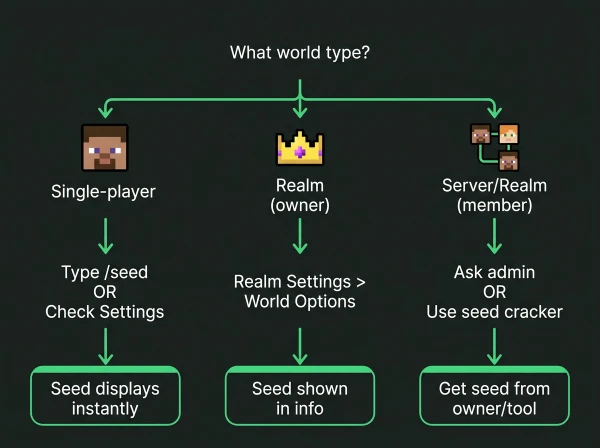
Java Edition Single-Player
Press T to open chat and type /seed
The seed displays instantly in chat as a long number.
Copy the full number, including the negative sign if present.
Bedrock Edition Single-Player
Open Settings > Game > scroll to the “Seed” field
The seed shows without needing commands or cheats.
Works even in worlds where cheats are disabled.
Alternative Method for Both Editions
Pause game > Settings > World settings > look for the Seed section
The seed appears in world information regardless of cheat settings.
How to Find the Seed of Minecraft Realm
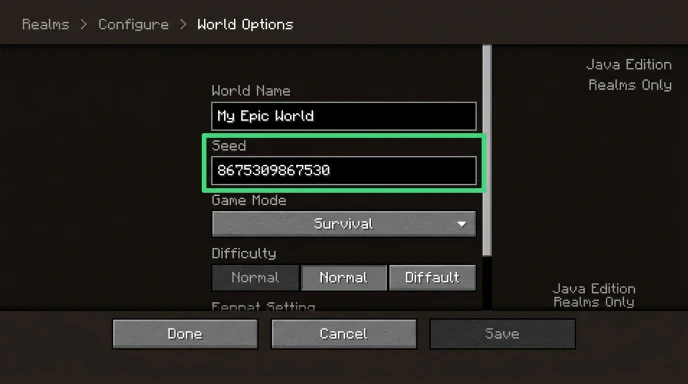
Realms have different permission systems for seed access.
Java Edition Realms (Owner)
- Open the Realms menu from the main screen
- Click your Realm
- Click “Configure”
- Select “World Options”
- The seed displays in the world information section
Java Edition Realms (Member)
Members cannot see the seed through Realm settings.
Ask the Realm owner to share it.
Alternatively, use seed cracking tools (explained below).
Bedrock Edition Realms
Bedrock Realms don’t display seeds in settings, even for owners.
The Realm owner must download the world, open it locally, then check seed in settings.
Members need permission to download or must use seed crackers.
How to Find Minecraft Seed on Server
Server seeds depend entirely on admin permissions.
If You Have Operator/Admin Access
Type /seed in chat.
The command works identically to single-player.
If You’re a Regular Player
The /seed command is usually disabled for non-ops.
Ask server administrators to share the seed.
Most public servers don’t share seeds to prevent structure-hunting exploits.
Third-Party Servers
Large multiplayer servers often use custom world generators.
These servers may not have traditional seeds or may refuse to share them.
Finding Seed Without Commands or Permission
Seed cracking uses visible coordinates and structures to calculate the seed.
Tools That Crack Seeds
- SeedCrackerX (Java mod)
- Seed Finder tools (online)
- ChunkBase seed finder (uses structure data)
How Seed Cracking Works
- Gather data from the world (coordinates, structures, biomes)
- Input data into seed cracking software
- Software calculates possible seed matches
- Verify seed by comparing world features
Data You Need to Collect
- Exact coordinates of multiple structures (strongholds, villages, temples)
- Biome locations and boundaries
- Dungeon or spawner coordinates
- At least 3-5 structure locations for accuracy
This method takes time but works on any world where you can explore.
Do Minecraft Realms Have Seeds?
Yes, absolutely. Every Minecraft world including Realms generates from a seed.
Realms are just hosted worlds. They follow the same generation rules as local worlds.
The seed determines terrain, biomes, structures, and ore placement identically to offline worlds.
Bedrock Realms simply don’t display the seed publicly in settings.
Using Seeds with OreFinder
Once you have your world seed, use it to find any structure or ore.
OreFinder maps your entire world using the seed.
Enter the seed and select what you’re looking for:
- Diamond ore locations
- Ancient debris coordinates
- Village positions
- Stronghold locations
- Biome boundaries
You get exact X, Y, Z coordinates for every feature in your world.
This works for seeds from single-player worlds, Realms, and servers.
For players hunting specific resources, check our guides on finding diamonds and ancient debris coordinates.
Seed Format and Compatibility
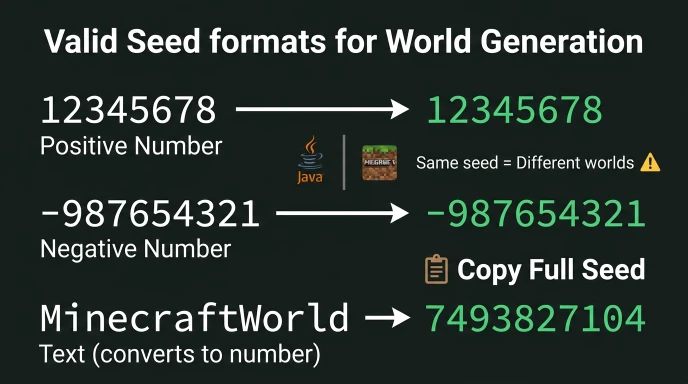
Seeds are numerical values (positive or negative integers).
Valid Seed Formats
- Numbers: 12345678
- Negative: -987654321
- Text: converts to numerical seed internally
Edition Compatibility
Java and Bedrock use the same seed format but generate different worlds.
A seed that works in Java Edition creates a completely different world in Bedrock.
Always specify which edition when sharing seeds.
Finding Someone Else’s Minecraft Seed
You can only get someone else’s seed through:
- Permission: They share it directly
- Server access: You have operator permissions
- Seed cracking: You gather structure data and calculate it
Attempting to access server files without permission violates most server rules.
Seed cracking from publicly visible structures is generally acceptable.
Common Seed Finding Mistakes
Confusing Java and Bedrock Seeds
The same numerical seed creates different worlds between editions.
Always verify which edition the seed is for.
Not Copying the Full Seed
Seeds can be 15+ digits long. Copy the entire number.
Missing even one digit changes the world completely.
Assuming All Commands Work Everywhere
/seed command requires operator permissions on servers and doesn’t work for Realm members.
Expecting Bedrock Realms to Show Seeds
Bedrock Realm owners must download the world to local storage first.
Seed Information Table
| World Type | Access Method | Requires Cheats | Requires Permission |
|---|---|---|---|
| Java Single-player | /seed or settings | No | No |
| Bedrock Single-player | Settings only | No | No |
| Java Realm (owner) | Realm settings | No | Owner only |
| Java Realm (member) | Ask owner | N/A | Yes |
| Bedrock Realm (owner) | Download world | No | Owner only |
| Bedrock Realm (member) | Ask owner | N/A | Yes |
| Server (op) | /seed command | No | Op required |
| Server (player) | Ask admin | N/A | Yes |
Why You Need Your World Seed
Seeds unlock every location-finding tool available.
With Your Seed You Can:
- Find strongholds without Eyes of Ender
- Locate rare biomes without exploring
- Get exact ore coordinates for efficient mining
- Plan bases near multiple biomes
- Share your world with others
Minecraft Ore Finder requires your seed to show these locations.
The tool can’t help without the seed because every world is unique.
FAQ
How do you find the seed of a Minecraft Realm?
Java Realm owners: Configure > World Options > Seed. Bedrock Realm owners: Download world to device, then check Settings > Game > Seed. Realm members must ask the owner for the seed or use seed cracking tools by gathering structure coordinates.
Can you find a Minecraft seed without the /seed command?
Yes. Use seed cracking tools by collecting coordinates of multiple structures like villages, temples, or strongholds. Input these coordinates into seed finder software which calculates possible seeds. Verify by comparing world features. This works on servers and Realms where /seed is disabled.
Do Minecraft Realms have seeds?
Yes. Every Minecraft world including Realms generates from a seed. Realms follow identical generation rules as local worlds. The seed determines all terrain, biomes, structures, and ore locations. Bedrock Realms simply don’t display seeds in settings without downloading the world first.
How to find seed on Minecraft server?
If you have operator/admin permissions, use /seed command. Regular players must ask server administrators to share the seed. Many public servers don’t share seeds to prevent exploits. Alternatively, use seed cracking by gathering structure coordinates and calculating the seed with third-party tools.
Where do you find the seed in Minecraft Bedrock?
Open Settings > Game > scroll to the “Seed” field. The seed displays without requiring cheats or commands. This works for single-player worlds. For Bedrock Realms, the owner must download the world to their device first, then check the seed in local world settings.
Get Your Seed and Start Finding
World seeds unlock every structure and ore location in your world.
Use /seed in single-player, check Realm settings, or ask server admins.
Once you have the seed, use Ore Finder to map your entire world instantly.
Stop exploring blindly and start navigating to exact coordinates for every resource you need.
Leave a Reply