
Finding seeds on Realms and servers is different from single-player worlds.
Access and visibility depend on your permissions and game edition.
Quick Answer: How to Find Realm Seed
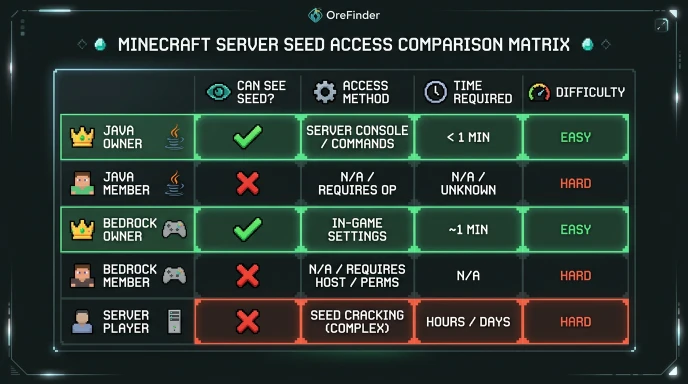
Java Realm owners: Go to Realm settings > Configure > World Options to see the seed.
Bedrock Realm: Download the world file to your device, then check local world settings.
Servers: Ask the admin or use seed-cracking tools if no command access.
Realms always have seeds, but access varies by edition and role.
Do Minecraft Realms Have Seeds?
Yes, absolutely. Every Minecraft world, including Realms, generates from a seed.
Realms use identical generation algorithms to single-player worlds.
The seed determines terrain, biomes, structures, and ore placement.
The difference with Realms:
- Realm owners can see the seed in settings
- Regular members often cannot access the seed directly
- Bedrock Realms hide seed data more restrictively
- Seeds don’t sync between Java and Bedrock editions
Realms are just hosted worlds with the same seed system.
Finding Seed of Minecraft Realm: By Edition
Java Edition Realm (Owner Access)
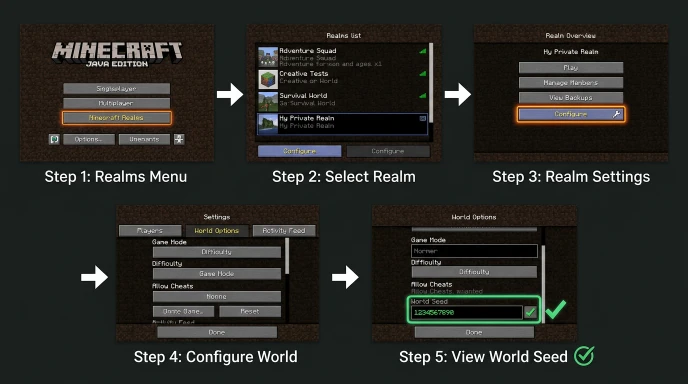
Step 1: Go to the main screen > Realms menu.
Step 2: Click your Realm name to open it.
Step 3: Click the “Configure” button.
Step 4: Select the “World Options” tab.
Step 5: The seed displays in the World Information section.
Copy the full seed number including negative signs.
Java Realm (Member Access)
Regular members cannot see seeds through Realm settings.
You must ask the Realm owner to share the seed.
Alternatively, use seed-cracking tools (explained below).
Bedrock Edition Realm (Owner)
Bedrock Realms don’t display seeds in settings, even for owners.
Workaround:
- Download the Realm world to your device
- Open Settings > Game on your device
- Scroll to the “Seed” field in world settings
- The seed displays in local world information
This requires downloading the entire world first.
Bedrock Edition Realm (Member)
Members cannot download Realms without owner permission.
Request the owner download and share the world.
Or ask them to provide the seed directly.
Seed-cracking from visible coordinates also works.
Finding Seed on Minecraft Server
Server seeds depend entirely on admin settings and permissions.
If You Have Operator Permissions
Type /seed command in chat while in-game.
The command works identically to single-player worlds.
The server must have cheats enabled for this to work.
If You’re a Regular Player
Most servers disable /seed command for non-ops.
Ask server administrators to share the seed.
Some servers publish seeds publicly in rules or MOTD.
Others refuse to share seeds to prevent exploits.
Third-Party Servers
Large public servers may use custom world generators.
These servers might not have traditional seeds.
Or they may have seeds but keep them private.
Check server documentation for seed sharing policies.
Finding Seed Without /Seed Command
Seed-cracking uses visible world features to calculate the seed.
What You Need
- Coordinates of multiple structures (villages, temples, strongholds)
- Biome locations and boundaries
- Dungeon or spawner positions
- At least 3-5 structure locations for accuracy
The more coordinates you gather, the more accurate the result.
Seed Cracking Process
- Explore world and find structure coordinates
- Use seed-cracking tool with coordinates
- Tool calculates possible seed matches
- Verify seed by checking world features match
Online seed crackers:
- ChunkBase (uses structure data)
- Seed Finder tools (various options)
- Specialized Minecraft calculators
This method works on any world where you can explore.
Bedrock Realm Seed Methods
Bedrock makes seed access more difficult than Java.
Method 1: Owner Downloads World
The owner downloads the Realm world to local storage.
Check local world settings for the seed.
Share the seed with members via chat or document.
Method 2: Ask Owner Directly
Simply request the seed from the Realm owner.
Most owners will share if you explain why you need it.
This is the fastest and most direct method.
Method 3: Use Seed Crackers
Gather coordinates of multiple biomes and structures.
Input coordinates into a seed-cracking tool.
Tool calculates the seed from visible features.
Works but requires significant exploration and coordinate gathering.
Using Seeds with Ore Finder Tools
Once you have your Realm or server seed, you can use it.
OreFinder maps exact resource locations using seeds.
Enter your seed into the tool to find:
- All diamond ore locations
- Ancient debris in the Nether
- Stronghold positions
- Rare biome coordinates
This works for Realm seeds and server seeds equally.
Having the seed unlocks your entire world’s resource locations.
For seed-finding specifics, check our detailed seed-finding guide.
Common Seed Finding Mistakes
Using a Java seed in Bedrock creates completely different worlds.
Not copying the full seed number (seeds are 15+ digits).
Assuming all Realm members can access seeds (they can’t).
Giving up without trying seed-cracking tools.
Not asking server admins for seed sharing policies.
Time to Get Realm/Server Seed
Java Realm owner: Instant (just check settings).
Bedrock Realm owner: 5-15 minutes (download and check).
Asking admin: Depends on response time.
Seed cracking: 1-3 hours (gathering coordinates).
Direct methods are always faster than seed cracking.
FAQ
How do you find the seed of a Minecraft realm?
Java owners: Realm settings > Configure > World Options > Seed displays. Bedrock owners: Download world to device, check Settings > Game > Seed field. Realm members: Ask the owner to share the seed. Use seed-cracking if the owner refuses.
Do Minecraft Realms have seeds?
Yes. Every Minecraft world, including Realms, generates from a seed. Realms follow identical generation rules to single-player worlds. Seeds determine terrain, biomes, structures, and ore placement. Bedrock Realms simply hide seed information more restrictively than Java Realms.
How to find the seed on Bedrock?
Bedrock Realm owners must download the world to their device first. Then check Settings > Game > scroll to the Seed field. Members need permission to download or must use seed-cracking with structure coordinates. This is more complex than Java Edition Realm access.
How to find seed without /seed command?
Use seed-cracking tools by gathering structure coordinates. Collect X, Z positions of villages, temples, strongholds, and biome boundaries. Input coordinates into the seed finder tool. The tool calculates possible seeds matching your world features.
Can you find someone’s Minecraft realm seed?
You can if the owner shares it. Seed-cracking from visible coordinates also works without permission. However, accessing server files without permission is prohibited. Seed-cracking from public exploration is acceptable and legitimate.
Get Your Realm Seed Now
Realm and server seeds are your gateway to resource mapping.
Check your Realm settings or ask your admin for the seed.
Once you have it, use OreFinder to find every resource instantly.
Stop exploring randomly and start navigating to exact ore coordinates.
Leave a Reply